
Getting started with CamoAdventures
Log your hunts, fishing trips and travels in one app with three logs: OneHunt Log™ (hunting), OneCatch Log™ (fishing) and OneTraveler Log™ (travel).
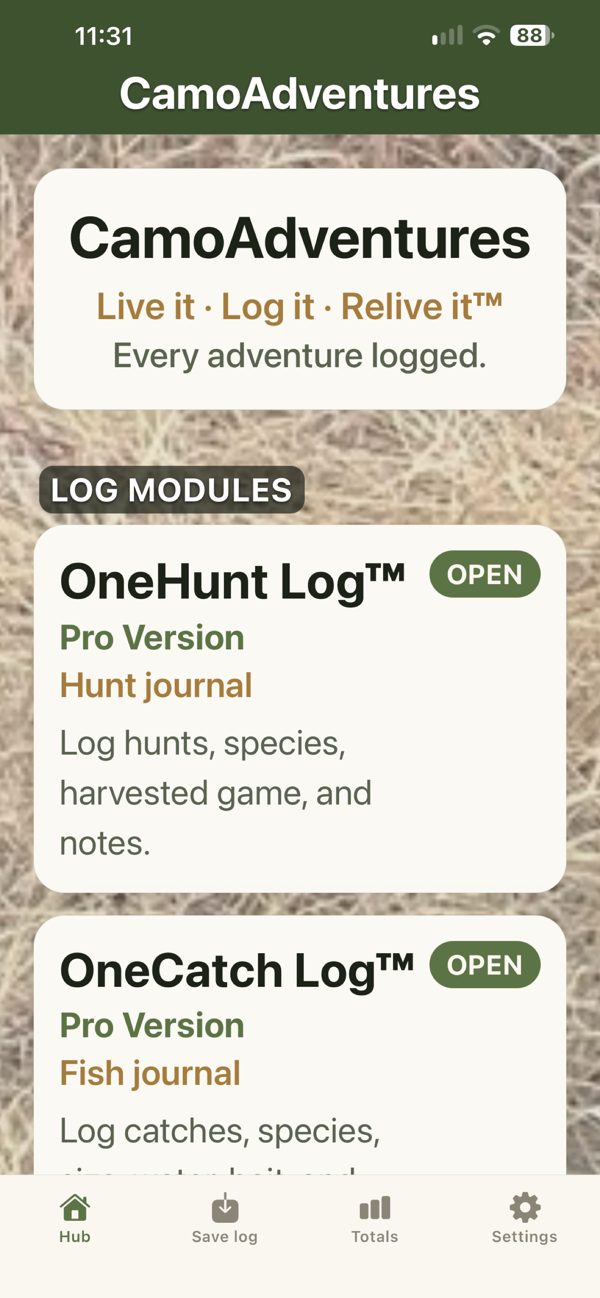
The Hub, with the three log cards under Log modules
- Get the app.
- iPhone: Open the App Store, search for CamoAdventures: Outdoor Logs, and tap Get.
- Android: Open Google Play, search for CamoAdventures: Outdoor Logs, and tap Install.
- Tap the CamoAdventures icon on your home screen to open the app. It opens on the Hub, which says Live it · Log it · Relive it™ and Every adventure logged.
- Under Log modules, tap a log card to open it: OneHunt Log™ (Hunt journal), OneCatch Log™ (Fish journal) or OneTraveler Log™ (Travel journal). Each card shows Free Version or Pro Version.
- Start logging. You don't need an account for the free version. The tabs at the bottom are Hub, Save log, Totals and Settings.
- Sign in (Pro only): Accounts are for Pro. Open Settings and, under Account, tap Sign in. You'll see Sign in to Pro.
- Enter your email, check I confirm I'm 18 or older, and tap Email me a code. We'll email you a 6-digit code.
- Type it into Code from the email, add your name (shown to people you follow) and tap Sign in. There's no password to remember.
Good to know
- Free keeps up to 20 entries per log and 1 photo per entry, stored only on your phone.
- The app asks to use your location only when you tap Use current location in an entry. It's optional. You can type the place instead.
- You must be 18 or older to create an account.
- We'll never call or text you for your code. Don't share it with anyone, including us.
- Your app version and build are at the bottom of Settings. Include them when you email support.
More guides: Backing up your data · Logging your first entry · Sharing with buddies · Upgrading to Pro, the Pro Suite or the Storage Pack · Restoring purchases · Adding buddies and groups
Still stuck? Email Luke@CamoAdventures.com.